- Home
- Directory
- Topics
- Energy & Atmosphere
- C-PACE
- Demand Response
- Energy Audits
- Energy Management System
- Energy Storage
- Fuel Cell
- Geothermal Heating
- Green Power
- HVAC
- High Efficiency Furnace
- High Efficiency Water Heater
- Insulation
- LED Lighting
- Lighting Controls
- Lighting Power Reduction
- Lighting Retrofit
- On-Site Renewable Energy
- Optimize Energy Performance
- Renewable Energy Supplier
- Solar Attic Fan
- Solar Photovoltaics
- Solar Pool Heater
- Solar Thermal
- Small Wind
- Smart Thermostat Installation
- Zero Energy Buildings
- Green Building Rating Systems
- Green Business and Careers
- Green Data Centers
- 179d Green Building Tax Deduction
- Additions & Remodels
- Architectural Design
- Commissioning
- Conscious Capitalism
- Green Building Insurance
- Green Commercial Buildings
- Green Homes
- Green Manufacturing
- Green Marketing
- Green Risk Management
- Green Jobs
- Health and Physical Activity
- Interior Design
- Property Assessed Clean Energy (PACE)
- Telecommuting
- Tiny House
- Vertical Farming
- Green Credentials
- Indoor Environmental Quality
- Location and Transportation
- Materials & Resources
- Sustainable Sites
- Water Efficiency
- Energy & Atmosphere
- Q&A
- News
- Education
- FAQ
- Contact Us

Google's Green Data Center ROI


Data centers represent some of the most critical infrastructure in your increasingly information dependent daily life.
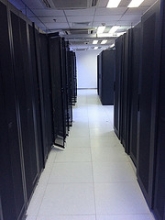
Data centers are increasingly important in our digital information driven lives.
Like many people, you probably find yourself increasingly reliant on services like Dropbox, Google, iTunes or Apple’s iCloud. The services run 24/7/365 in the background of our lives, storing and giving us access to personal data (documents, music, movies, files, photos, software applications, contacts, schedule, etc), almost instantly, on demand.
While fifteen years ago it was a challenge to even move phone numbers from one cellphone to the next if you switched carriers, today we have much of our lives stored in mobile devices and don’t even think about them as they do things that only a decade or so ago would have been indistinguishable from magic.
Without data centers, the applications and devices we love, our iPhones, iPads, Android devices, etc. would be like bricks, unable to access our data and services in the cloud.
But what is the "cloud"?
Growth of Cloud Computing
Industry research suggests that the market for “cloud services” will only get bigger. The cloud, or cloud services, allow businesses and individuals to adopt new technologies without having to manage those technologies themselves.
Cloud computing can also be referred to as software as a service, or SaaS, which enables users to pay a monthly fee for technology that would be cost prohibitive for individuals or companies to invest in and develop on their own. The cloud provides increasing amounts of leverage to smaller businesses by giving them access to tools that until recently were only available to large companies.
While cloud computing is a relatively new concept, the data centers they rely on have been around for decades. Indeed, most Internet traffic has originated or terminated in a data center since 2008.
A report by Cisco Systems states that “the impact of cloud computing on data center traffic is clear. Data center traffic will continue to dominate Internet traffic for the foreseeable future.”
But our increasing addiction to mobile devices and instant, always on media have made the demands on data centers more energy intensive, over time.
The Cisco report continues, “the nature of data center traffic is undergoing a fundamental transformation brought about by cloud applications, services, and infrastructure. The importance and relevance of the global cloud evolution is highlighted by one of the top-line projections from this updated forecast, specifically that by 2017 sixty-nine percent, or over two-thirds of data center traffic, will be cloud traffic.”
LEED and Green Data Centers
As demand for cloud computing in data centers grows, energy efficiency planning in these buildings often starts in the design phase.
According a survey of data center operators by the “Uptime Institute”, the number of companies seeking “green” design and performance certifications, such as the U.S. Green Building Council’s Leadership in Energy and Environmental Design (LEED) green building rating, is increasing.
Indeed, over half of the respondents in their survey reported pursuing a green certification. In the U.S. the most common green certifications are LEED and ENERGY STAR for energy efficient buildings. The EU “Code of Conduct” certification was created for European Union data centers to stimulate data center operators and owners to reduce energy consumption.
USGBC, the developer of the green building rating systems, has developed the LEED for Data Centers rating system with the latest rating system overhaul, known as “v4”.
In LEED for Data Centers, the largest number of points is in the Energy and Atmosphere credit category, which includes 29, out of 110 total available points. Optimize Energy Performance, a critical prerequisite and credit in the LEED rating systems, can represent almost 50% of the points needed to achieve LEED certification. A LEED Certified data center can earn points in a variety of ways, such as for implementing a demand response program, using on site renewable energy and for optimizing energy efficiency.
Cloud Computing and Green Data Centers
But data center operators do not have to pursue a building certification to reap the benefits of smart, efficient design.
Data center operators are learning how to be more efficient by communicating and measuring their performance with industry wide standards of energy efficiency, such as Power Usage Effectiveness (PUE):
PUE is a measure of efficiency in data centers. Specifically, PUE measures how efficiently a building delivers energy to the IT equipment.
PUE compares the amount of non-computing “overhead” energy that is needed for building operations, such as cooling and power distribution (referred to as the Facility Overhead Energy), in relation to the energy that is required to process data and what is needed to power the machines (referred to as the IT Equipment Energy).
The above formula is taken from a “Point of Presence” case study by Google, which saves millions of dollars every year (and avoids emitting tens of thousands of tons of carbon dioxide) through data center efficiency.
The ideal PUE value/score = 1. A score of 1 means that there is zero additional “Facility Overhead Energy” needed and that 100% of the energy used by the building goes to serving “IT Equipment Energy”.
Google Data Centers
Google has had success with making its numerous data centers more efficient. Indeed, this case study shows that Google has succeeded in designing data centers that use only half as much energy as a typical data center.
The company operates many massive data centers, but also runs many smaller operations called “Points of Presence” (“POPs”). Amid the arms race for greater computing power between massive tech companies like Apple, Facebook, Google, Amazon and Oracle who vie for access to our data, the operational costs of these smaller data centers adds up quickly.
In the aforementioned “green” POP data center case study, Google considered how it might improve its performance, as well as extend the life of the equipment, by making changes to its operations. To do so the search giant developed a series of best practices:
- Best practice #1: Measuring Performance
- Best practice #2: Optimize air flow
- Best practice #3: Turn up the thermostat
When Google engineers evaluated the POP, the team found an initial PUE of 2.4, which they considered to be very high. On further analysis they found that this particular POP was designed to operate 250 kW of computing equipment, but was only running 85 kW at the time. Also, the air conditioners were all on, resulting in overcooling and wasted energy.
The team wanted to improve the efficiency of the cooling, maximize the use of the data center capacity by adding computing power, and turning off a number of computer room air conditioning units, called CRACs, so that energy could be saved and computing power optimized.
The team installed temperature monitors and examined the airflow in the data center equipment rows and developed a thermal model to run airflow simulations. By doing so, they found that a lot of the cold air was bypassing the machines altogether after it came out of the CRACs. The temperature sensors also found “hot spots” in the data center rows which is the result of an imbalance between IT load and air flow.
With this information, the team was able to read temperature in critical monitoring points in the data center, which told them that the thermostat could be turned up as long as they maintained accurate temperature readings. They also took steps to optimize air flow throughout the racks by arranging vent tiles to push air where it was needed and matching IT power to cold air flow. By doing so they were able to reduce hot spots. This optimization allowed them to increase the temperature of the room to 77 degrees Fahrenheit, from 71 degrees. They also made adjustments to the CRAC unit controller to improve its performance and make it less sensitive to temperature changes and relative humidity.
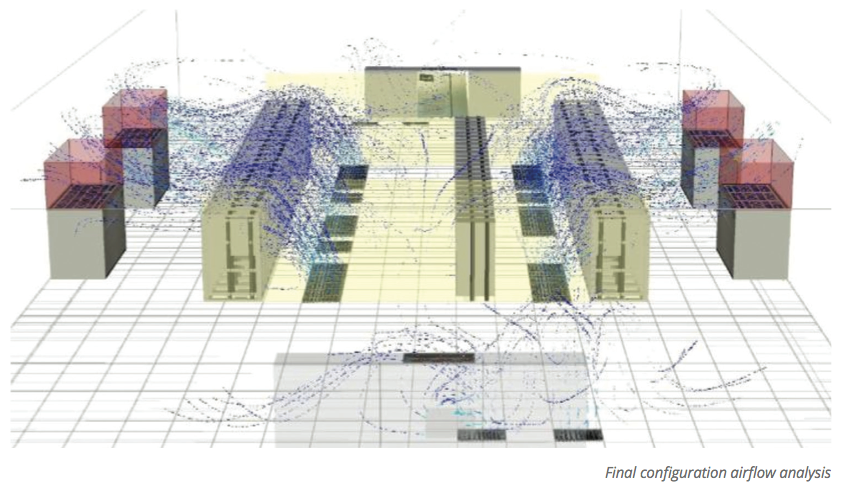
All data centers use an Uninterruptible Power Source, or UPS. The UPS required a lower temperature than 77 degrees Fahrenheit, so to isolate and properly condition the UPS, the team created what could be akin to a meat locker or walk in refrigerator using transparent plastic curtains surrounding the UPS.
By doing these things, the team saw a PUE drop from 2.4 to 2.2.
However, this was not enough to shut off any of the seemingly superfluous CRACs, given that the POP was using less than half its designed for amount of computing power. To further optimize air flow and shut off the additional CRACs, the team used more refrigerator curtains to seal the cold aisles and used blanking plates on the back of any space in the racks that did not hold a server or other IT equipment. The team then optimized the air returns to address falsely elevated temperature readings in the hot aisle. The false temperature reading was causing one of the CRACs to run more often than necessary. By reconfiguring the height of air returns, the team was able even out the air flow and further prevent hot spots from occurring, specifically those near temperature sensors that would cause CRACs to fire unnecessarily.
On the energy side, the team achieved lighting power reduction by installing motion sensors on site to turn off overhead lighting when the server room was not occupied. They also installed a central CRAC controller tied to the temperature monitors in the room to turn on only the number of AC units necessary at any given time. For instance, if the IT computing power and use demanded 1 CRAC, the central controller would only turn on that unit, however if the controller determined that three CRACs were needed, three would be used.
The result was a final PUE of 1.5, compared to the original PUE of 2.4, or a reduction (increase in efficiency) of more than 30%.
After evaluating its green POP improvements, Google’s ROI, and improved clean cash flow, resulted $67,000 in annual energy savings on an investment of $25,000.
While this is a drop in the bucket for a company like Google, an investment that more than doubled in less that one year is considered a home run in any scenario. Because efficient energy use is the gift that keeps on giving, these smart choices will result in hundreds of thousands of dollars in savings over the life of the equipment.
---
Image credits: Google and USGBC.org
 Learn about how LEED addresses energy modeling to maximize energy efficiency in commercial buildings in the "Optimize Energy Performance" prerequisite and credit which is relevant to every LEED rating system. You'll Earn 2 Continuing Education Units (CEUs) in as little as 1 hour. Only $29.95!
Connect.
Find members with green building and green business skills and experience.
Meet Pros.

Learn.
Relevant education and training to consider.
News.


Q&A.

Why join Poplar Network?

- Full Year Professional/Business Listing
- Professional Q&A Service
- Save on Exam Prep and CE
- FREE 9.5 Hour LEED CE pack
- Exclusive Industry Discounts
- Connect with Peers